New Update:
light_mode
Trending Tags
Beranda » En » DistroSea: A Fun Way to Try Linux Distros Without Installing Anything
En

DistroSea: A Fun Way to Try Linux Distros Without Installing Anything

  • account_circle SaidWP - Blog
  • calendar_month Selasa, 15 Jul 2025
  • visibility 698
  • comment 0 komentar
  • print Cetak

info Atur ukuran teks artikel ini untuk mendapatkan pengalaman membaca terbaik.

Curious About Linux But Don’t Wanna Mess Up Your Laptop?

So here’s the deal…
Maybe you’ve heard about Linux. You’re a little curious. But the moment you hear “install,” “partition,” or “dual boot,” your brain shuts down. Sounds too techy? We get it.

The good news?
You don’t need to install anything to try Linux now. Say hello to DistroSea — your new playground to explore Linux, all from the comfort of your browser.

So, What Exactly Is DistroSea?

DistroSea is a web-based platform that lets you test-drive different Linux and BSD distros through your browser — yep, no downloading, no setup, no virtual machines.

It uses noVNC to stream a live Linux desktop to your screen. Just pick a distro, hit “Start,” and boom — you’re inside a Linux environment.

They support 60+ distros, from the big names like Ubuntu and Fedora to the more niche ones like Arch, Kali, and elementary OS. And yes, it’s free!

Why Bother Trying DistroSea?

Here’s why you’ll love it:

  • 🖱 No hassle: Just one click and you’re in.
  • 🧠 Learn without fear: Break the system? Who cares. It’s not your laptop.
  • 🔍 Preview UIs: Compare different desktop environments like GNOME, KDE, Xfce, and more.
  • 🎓 Perfect for beginners, students, devs, or anyone curious.

It’s like trying on clothes before you buy them — but with Linux.

Pros and Cons of DistroSea

✅ Pros:

  • Free and easy to use
  • No installation or downloads
  • Great for learning and exploring Linux environments
  • Wide distro selection (Ubuntu, Mint, Arch, etc.)

⚠️ Cons:

  • No internet access inside the VM
  • Can be slow if you’re far from their servers (likely located in Asia)
  • You can’t install software or make permanent changes

But for a quick peek into the Linux world? DistroSea delivers.
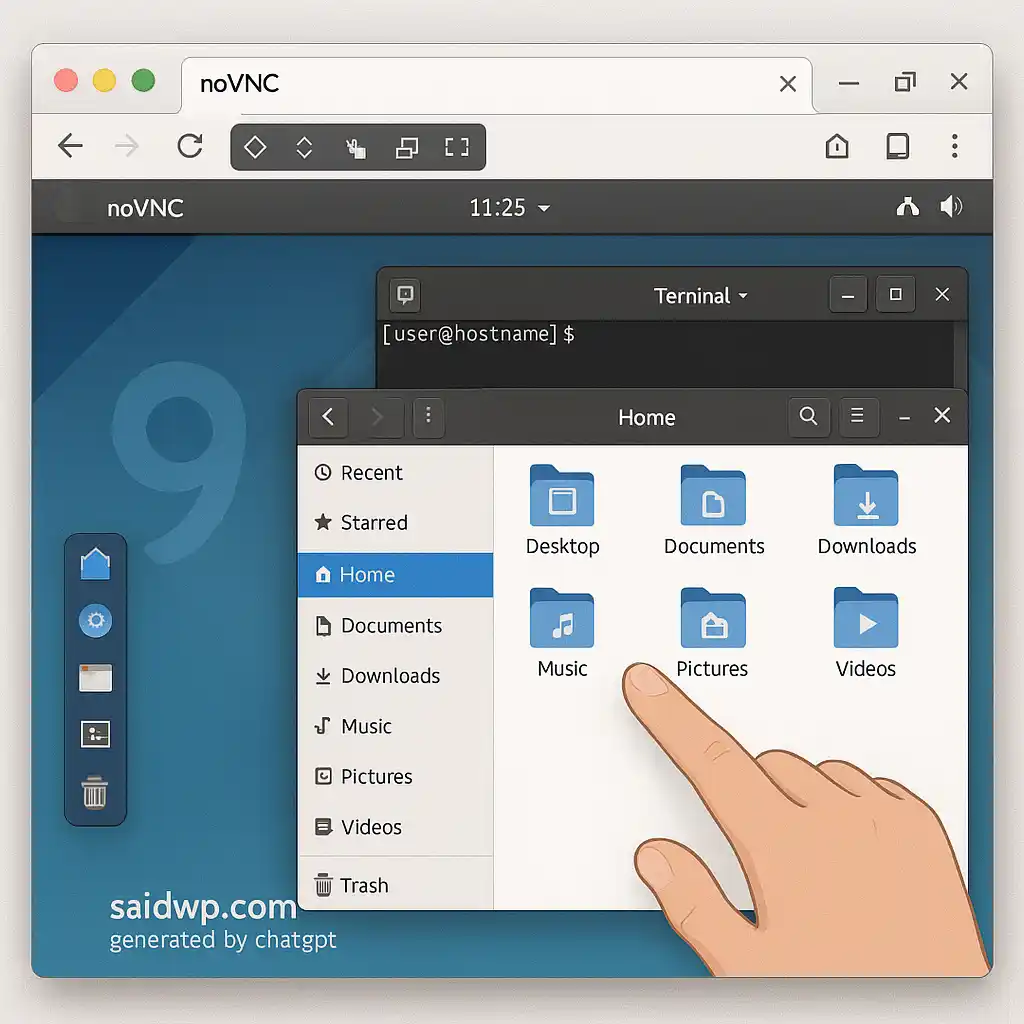
DistroSea

How To Use DistroSea in 4 Steps

  1. Go to https://distrosea.com
  2. Pick a Linux distro
  3. Click Start
  4. Wait a few seconds and boom — Linux in your browser

Even your grandma could do it. It’s that simple.

Who Is DistroSea For?

  • 💻 Students learning Linux basics
  • 🧪 Tinkerers who love testing UIs
  • ✍️ Writers/content creators needing Linux screenshots
  • 🧑‍💼 Freelancers helping Linux-based clients
  • Or just you, chilling at a cafe, exploring Linux for fun.

If you’re curious about Linux but don’t want to break your main system, DistroSea is your low-risk, high-fun zone.

So… Is DistroSea Worth It?

Absolutely — as long as you keep your expectations in check.

It’s not for serious production testing.
But if you just want to explore, learn, and get comfortable with the Linux desktop experience — then it’s perfect.

Wanna go deeper? Set up your own VPS and start playing for real.

Ready to Explore Linux for Real?

If you’re ready to build something bigger — like your own Linux server or email system — I’ve got you covered.

From setting up VPS, installing panels like CyberPanel or aaPanel, migrating websites, to email servers (like BillionMail) — let me handle the tech.

👉 Explore My Services at saidwp.com/jasa

Let’s turn your Linux curiosity into something powerful 🔥

Which Linux distro would you try first with DistroSea?
Let me know in the comments or DM! 😊

  • Penulis: SaidWP - Blog

Komentar (0)

Saat ini belum ada komentar

Silahkan tulis komentar Anda

Email Anda tidak akan dipublikasikan. Kolom yang bertanda bintang (*) wajib diisi


Rekomendasi Untuk Anda

  • cara install aaPanel di VPS Ubuntu

    Cara Install aaPanel di VPS Ubuntu untuk Pemula

    • calendar_month Selasa, 6 Mei 2025
    • account_circle SaidWP - Blog
    • visibility 1.094
    • 0Komentar

    Kalau kamu baru mulai belajar server dan bingung harus pakai panel apa, jawabannya simpel: cobain aaPanel. Panel gratis ini cocok banget buat pemula yang ingin mengelola VPS tanpa ribet. Di artikel ini, kita bahas cara install aaPanel di VPS Ubuntu dari nol, lengkap dan mudah dipahami. Kenapa aaPanel? aaPanel adalah control panel berbasis web yang […]

  • Harga Jasa Pembuatan Website Profesional

    Berapa Harga Jasa Pembuatan Website Profesional 2025

    • calendar_month Rabu, 21 Agt 2024
    • account_circle SaidWP - Post
    • visibility 938
    • 0Komentar

    Dalam Artikel Penjelasan Jasa Pembuatan Website dengan WordPress ini kami akan membahas poin-poin penting utama yg akan menjadi acuan.

  • Elon Musk Apple ChatGPT

    Elon Musk Ancam Gugat Apple soal ChatGPT di App Store

    • calendar_month Rabu, 13 Agt 2025
    • account_circle SaidWP - Blog
    • visibility 307
    • 0Komentar

    Apakah ini masalah monopoli atau cuma drama persaingan AI? Drama Terbaru Elon Musk: Dari X, Langsung ke Meja Hijau? Elon Musk itu kalau soal ribut di media sosial udah langganan. Tapi kali ini, targetnya bukan sekadar kompetitor biasa, melainkan Apple dan App Store. Pada 12 Agustus 2025, bos Tesla sekaligus pendiri xAI ini menuduh Apple […]

  • BillionMail v4.5

    BillionMail v4.5: Upgrade Bulk Email & Fitur Marketing

    • calendar_month Sabtu, 20 Sep 2025
    • account_circle SaidWP - Blog
    • visibility 631
    • 0Komentar

    Pada rilis sebelumnya, BillionMail v4.4 menghadirkan upgrade yang berfokus pada stabilitas dan keamanan. Mulai dari fitur Outbound IP Binding, optimasi konfigurasi Postfix, penguatan kemananan interface, hingga perbaikan pada update otomatis SSL. Semua ini membuat BillionMail jadi lebih andal untuk jangka panjang【baca: BillionMail v4.4 update↗】. Kini, BillionMail melanjutkan perjalanannya dengan versi 4.5. Fokus kali ini adalah […]

  • mitos terminal Linux

     9 Mitos Terminal Linux yang Harus Kamu Berhenti Percayai

    • calendar_month Selasa, 22 Jul 2025
    • account_circle SaidWP - Blog
    • visibility 506
    • 0Komentar

    Terminal Linux Nggak Sehoror Itu, Kok! Pernah ngerasa keringetan dingin waktu buka terminal Linux? Atau takut ngetik salah satu karakter terus sistem langsung rusak total? Tenang, kamu nggak sendiri. Tapi bisa jadi kamu selama ini percaya sama mitos tentang terminal Linux yang udah nggak relevan lagi. Disclaimer:Artikel ini merupakan alih bahasa dan adaptasi bebas dari […]

  • Bill Gates dan Linus Torvalds

    Bill Gates dan Linus Torvalds Akhirnya Ketemu Juga: Makan Malam Santai Tanpa Bahas Kernel

    • calendar_month Senin, 23 Jun 2025
    • account_circle SaidWP - Blog
    • visibility 688
    • 0Komentar

    Awal Pertemuan yang Ditunggu-Tunggu Bill Gates dan Linus Torvalds akhirnya ketemu juga! Dua sosok legendaris di dunia teknologi ini selama puluhan tahun dikenal sebagai rival, terutama karena sejarah antara Windows dan Linux. Tapi di pertemuan ini? Gak ada debat panas atau sindir-sindiran. Cuma makan malam bareng yang santai dan penuh tawa. Kejadian ini terjadi belum […]

expand_less