Forward Proxy vs Reverse Proxy: What’s the Difference?
- account_circle SaidWP - Blog
- calendar_month Tuesday, 2 Sep 2025
- visibility 814
- comment 0 comment
- print Cetak

info Adjust the font size of this article to get the best reading experience.
If you’ve ever tinkered with networks or just skimmed articles about servers, chances are you’ve bumped into the term proxy.
The tricky part is: there are two kinds that often confuse people, forward proxy and reverse proxy.
At first glance they sound similar, both act as a “middleman.”
But how they work is actually very different. Let’s break it down with some everyday analogies so it doesn’t feel too technical.
Forward Proxy: “Passing the Message” from the Client
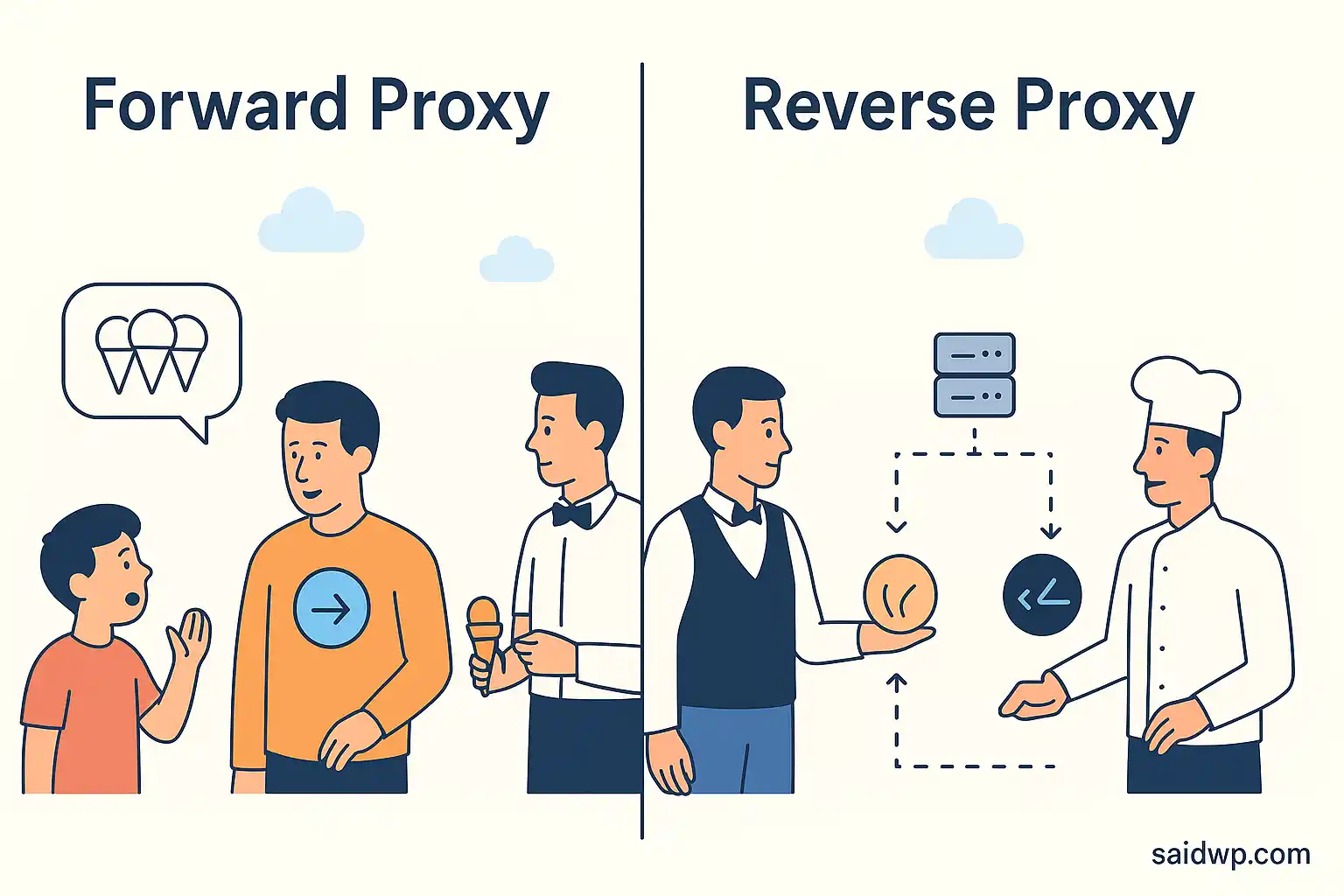
Imagine you’re a kid on a family trip to Italy. You tell your dad: “I want nine ice creams!” 🍦
But when the waiter arrives, your dad only orders one ice cream, and in Italian.
In this analogy:
- You = the client
- Your dad = the forward proxy
- The waiter = the internet
Your dad acts as the middleman, filtering your request and even “translating” it to fit the situation.
How a forward proxy works
- The client sends a request to the forward proxy
- The proxy checks and forwards it to the internet
- The server responds back to the proxy
- The proxy passes it back to the client
Common use cases
Forward proxies are everywhere, in schools, offices, even ISPs in Indonesia (think Indihome or XL). They’re used for:
- Caching: storing popular content (like trending YouTube videos) to save bandwidth.
- Filtering: blocking certain sites based on policy (gambling sites, adult content, etc.).
- Anonymity: hiding the real client IP for privacy.
Drawbacks
- Can add extra latency when the cache is missed.
- Requires manual setup on the client side.
- Doesn’t protect the server, it only manages requests from the user’s side.
👉 In short: a forward proxy makes sense when you need control on the user side or within a local network.
Reverse Proxy: “The Gatekeeper” in Front of the Server
Now let’s go back to our restaurant story.
The waiter doesn’t just run into the kitchen and shout directly at the chef.
Instead, there’s a kitchen expeditor who manages everything: order A goes to the ice cream chef, order B goes to the pasta chef.
In this analogy:
- The waiter = the internet
- The kitchen expeditor = the reverse proxy
- The chefs = the servers
A reverse proxy works like a gatekeeper + coordinator. The servers aren’t exposed directly to the internet; everything passes through the same secure door.
How a reverse proxy works
- The client sends a request to the reverse proxy
- The proxy forwards it to the right server
- The server responds back to the proxy
- The proxy returns it to the client as if it came from the origin server
Common use cases
Reverse proxies are super popular in modern infrastructure. You can set them up with Nginx, HAProxy, or Traefik. They’re used for things like:
- TLS termination: handling encryption/decryption so the app server doesn’t have to.
- Load balancing: distributing traffic evenly across multiple servers.
- Security: hiding the server’s real IP to reduce DDoS risk.
- Caching: storing static files like images to reduce server load.
- A/B testing: sending a slice of users to a new version of the app.
- Authentication & Authorization: verifying client identity before access.
- Content Delivery Networks (CDN): almost every major CDN (Cloudflare, Akamai, Fastly) is built on top of reverse proxy concepts. That’s why so many Indonesian website owners use Cloudflare — faster sites, safer servers.
Drawbacks
- More complex to manage.
- Can become a single point of failure if not set up with redundancy.
👉 Bottom line: reverse proxies are ideal for server-side needs, especially once your site or app starts pulling bigger traffic.
Conclusion
To wrap it up:
- Forward proxy = a middleman on the client side. Great for access control, caching, and anonymity.
- Reverse proxy = a middleman on the server side. Great for security, performance, CDNs, and scalability.
If you’re managing a school or office network, forward proxy is still a go-to.
But if you’re running a website or app with growing traffic, reverse proxy (or a CDN) is your best bet.
Proxies aren’t just “detours” in the network, they’re strategies that make the internet safer and more efficient.
References:
- Author: SaidWP - Blog






At the moment there is no comment